




|
|
|
|
|
|
Answers Database
LogiCORE PCI64 Virtex (v3.x): Plugging a 64-bit card in a 32-bit slot
Record #7152
Product Family: Documentation 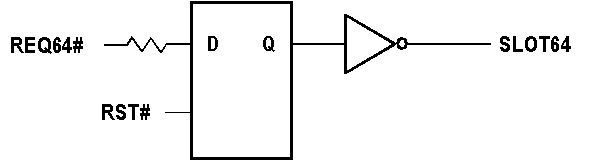 Using an external flip-flop to drive SLOT64 This technique is not technically compliant with the PCI spec as it causes extra loading on REQ64# and RST#. However, using a large series resistor can minimize the loading effects. The inverter may be pushed into the FPGA. Solution 3: Embedded Systems: The bus width here is pre-determined as the system is closed. The designer can drive SLOT64 from the output of a flip-flop set high upon PCI reset. Solution 4: Open Systems: The designer can push a flip-flop inside the FPGA to sample REQ64# 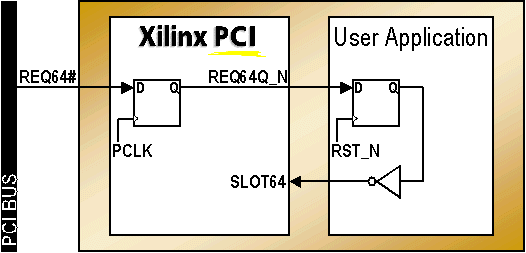 Using a flip-flop inside the FPGA to drive SLOT64 The designer must make sure that the FPGA downloads the bitstream quickly enough. Even though the spec mentions that the RST# time is 1ms, for practical purposes, systems require ~20ms to come out of reset. The 20ms value can be used as a good rule of the thumb. This is the recommended method when using small to medium sized devices with fast FPGA configuration modes. Note: For this solution to work, the following modifications must be made to the placed and routed NCD file using FPGA Editor - 1. Find the location constraint (site) for the NET named PCI_CORE/REQ64_IO from constraint file (UCF) supplied with the LogiCORE PCI interface. 2. Open the pcim_top_routed.ncd file in FPGA editor 3. Find the relevent site in the FPGA editor. Turning the FPGA Editor text option on should display the text "REQ64_N". 4. Select this block and click on the editblock button. 5. Search for the IFF in this block and turn off the RESET (INIT) line. Leave the rest of the RESETs untouched. 6. Save and exit FPGA Editor. 7. Run bitgen on the modified NCD file. End of Record #7152 - Last Modified: 10/25/99 11:57 |
| For the latest news, design tips, and patch information on the Xilinx design environment, check out the Technical Tips! |